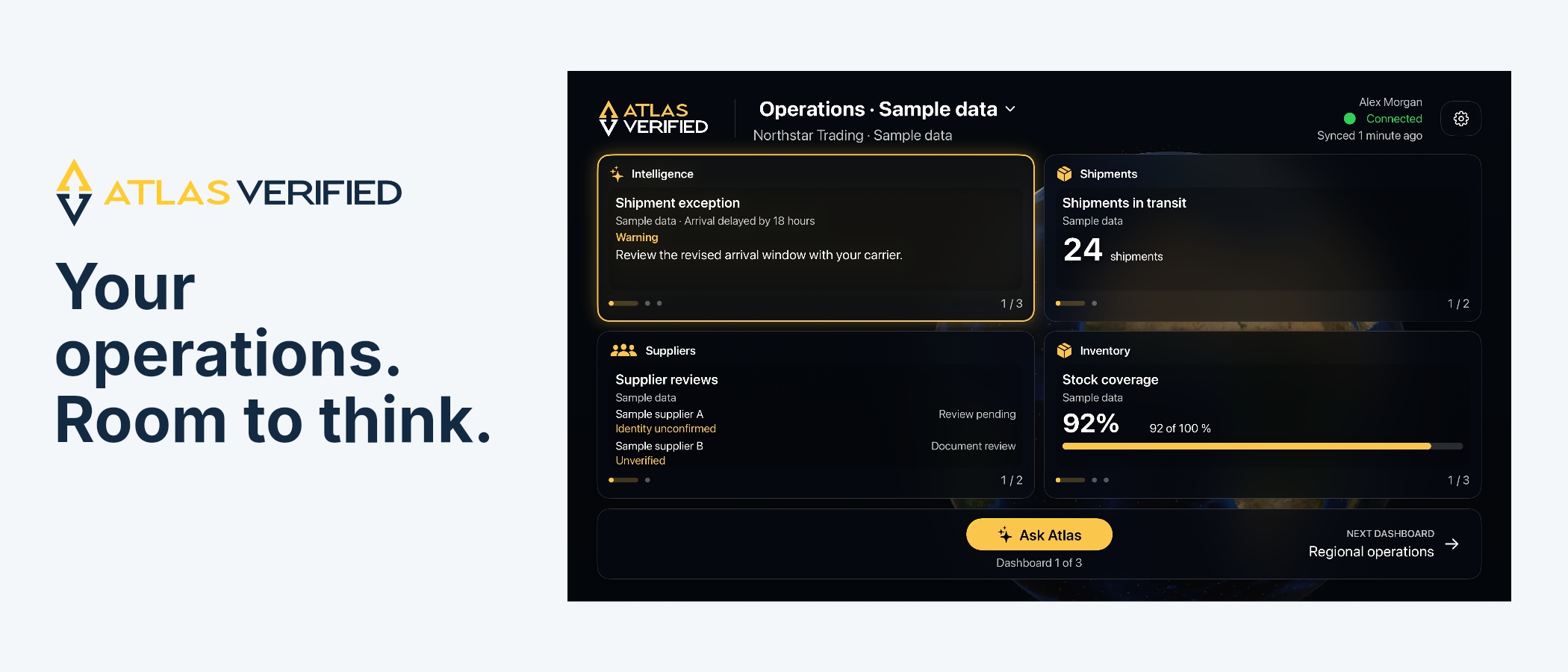
Atlas Verified TV is now available on the App Store. It brings your organization’s intelligence, shipments, suppliers, and inventory onto a shared screen, with dashboards to see what needs attention and Ask Atlas to work through the questions that follow.
Download Atlas Verified TV for Apple TV.
Why put a trade platform on a television?
A team walks into a meeting with a simple question: what needs our attention? The answer may be spread across a shipment record, a supplier’s documents, an inventory update, and a conversation from yesterday. Before the team can discuss the work, someone has to find it, open the right screens, and explain how the pieces fit together. The first few minutes go to reconstructing context.
We built Atlas for Apple TV because that context should be easier to bring into the room. A television makes the problem unusually concrete. There is no comfortable place for a dense table of fields, a row of browser tabs, or a complicated navigation tree. The screen may be several feet away, the control is a remote, and the audience is a group trying to make a decision together. Every element has to justify the attention it asks for.
Those constraints made Apple TV a useful place to work on an idea that extends beyond the device. We believe more business software will be used through ChatGPT-style conversations and informational interfaces that assemble what people need for the task at hand. The system of record will continue to hold the operation together, even as people spend less time navigating its traditional screens.
The question comes before the screen
Ask a trade team what it needs to know before a shipment arrives. The answer may involve the route, a supplier’s documents, a missing preparation item, and a decision waiting on another person. The question crosses the boundaries of the application’s modules. In a conventional interface, the user often does the integration: open the shipment, find the supplier, inspect the documents, and reconstruct the relationship between them.
A conversational interface starts closer to the person’s intent. They can ask what needs attention, then explore the answer and its supporting information. Our broader design direction is to make the presentation respond to the work as well. A route may be clearer on a map. A set of exceptions may belong in a short table. A disputed detail may need an explanation beside its source. The form should follow what the person is trying to understand.
That is our view of generative UI: software that assembles information and presentation around an objective. A precise record editor remains valuable when someone needs to correct a field. A conversation helps someone express a question. An informational display gives a team a shared view. Each has a purpose, and the underlying records need to make sense across all three.

Some information should arrive before the question
Chat works well when someone knows what they want to ask. Operational awareness has a different rhythm. A team entering a meeting may need to see what changed since the last discussion. A shipment exception may deserve attention before anyone thinks to request a report. An informational interface can make selected findings available in the background, giving people a starting point for the conversation.
Atlas Verified TV brings that role to a shared display. Rotating insight cards, operational metrics, charts, and alerts put the organization’s configured dashboards in view. A person can open a card to explore its details and supporting information, or switch dashboards with the remote as the conversation changes. The interactive 3D globe adds geographic context to shipment routes and locations.
When a card raises a question, Ask Atlas is available on the TV. People can type or dictate through native TV text entry, read the answer, explore available sources, and expand a longer response for more comfortable reading. The overview and the investigation serve different purposes, but they belong in the same experience.
A shared screen also changes what makes an answer useful. Information that works for one person studying a laptop can overwhelm a group. The display needs to establish the main point quickly and let someone deliberately open the supporting detail. If it asks everyone to read a wall of text, it has moved a desktop problem onto a larger screen.
Let the information change without moving the controls
Atlas for Apple TV is a native tvOS application, with a stable structure for navigation and presentation. Intelligence arrives through defined cards, dashboards, and detail views. A person can learn how to move through them with the remote while the information inside them changes.
That distinction matters because flexibility has a cost. If the position of a control or the meaning of a remote action changes unpredictably with each answer, the interface consumes attention that should belong to the information. We want the system to choose useful content without making people relearn how to open it, move through it, or return to the view they came from.
The app uses a native shell with bounded presentation formats. A model does not invent arbitrary native code for every screen. That gives navigation a dependable structure while leaving room for the intelligence inside it to adapt. This is one practical step toward our broader view of generative UI: make the information responsive to the question, and keep the interaction understandable to the person asking it.

The system of record moves underneath the experience
As the interface becomes more flexible, the underlying records need to become more dependable. A generated answer still needs to refer to the correct shipment. A supplier finding still needs to distinguish one legal entity from another. A chart needs to draw on identifiable data, and access needs to be determined by the organization’s permissions. Those facts must hold even when the visible response looks different from one question to the next.
This is where we see Atlas’s long-term role. The platform carries documents, relationships, access rules, and the history of the work. Conversational and informational interfaces can use those capabilities without independently rebuilding the business’s meaning. A person may encounter the result in chat, on a television, or in a structured review screen; the record beneath it should still be inspectable.
The TV experience follows that approach. Ask Atlas connects to the platform’s shared investigation infrastructure, with a presentation designed for the television. Answers, activity, and supporting sources reach the screen through that connection. The organization’s configured dashboards and permissions determine what is available, so a shared display remains connected to a defined operational context.
Bring Atlas into the room
Install Atlas Verified TV from the App Store on an Apple TV running tvOS 26.0 or later. You’ll need an existing Atlas Verified account and access to an organization with a configured TV dashboard. Pair the television using a sync code from the Atlas Verified platform, then use the remote to move between your organization’s dashboards. Available information and features depend on your configuration and permissions.
Our expectation is that people will move naturally between asking, noticing, and reviewing. A conversation helps express intent. An informational display brings relevant changes into view. A structured screen gives a person precision when a decision or correction demands it. Building for Apple TV forced us to be specific about what each interface is for—and about the records that need to remain dependable underneath it.
Download Atlas Verified TV and bring your operations into the room. If you need help getting your first dashboard ready, book a walkthrough with our team.